Maximizing Your Website’s Potential with Google Search Console: A Comprehensive Guide
The Power of Google Search Console: A Comprehensive Guide
Google Search Console is a powerful tool that offers invaluable insights into your website’s performance in Google search results. Whether you’re a seasoned webmaster or just starting out, understanding and utilizing Google Search Console can significantly impact your online presence.
What is Google Search Console?
Formerly known as Google Webmaster Tools, Google Search Console is a free service provided by Google that helps webmasters monitor, maintain, and troubleshoot their site’s presence in Google search results. It offers a range of tools and reports to help you optimize your website for search engines.
Key Features of Google Search Console
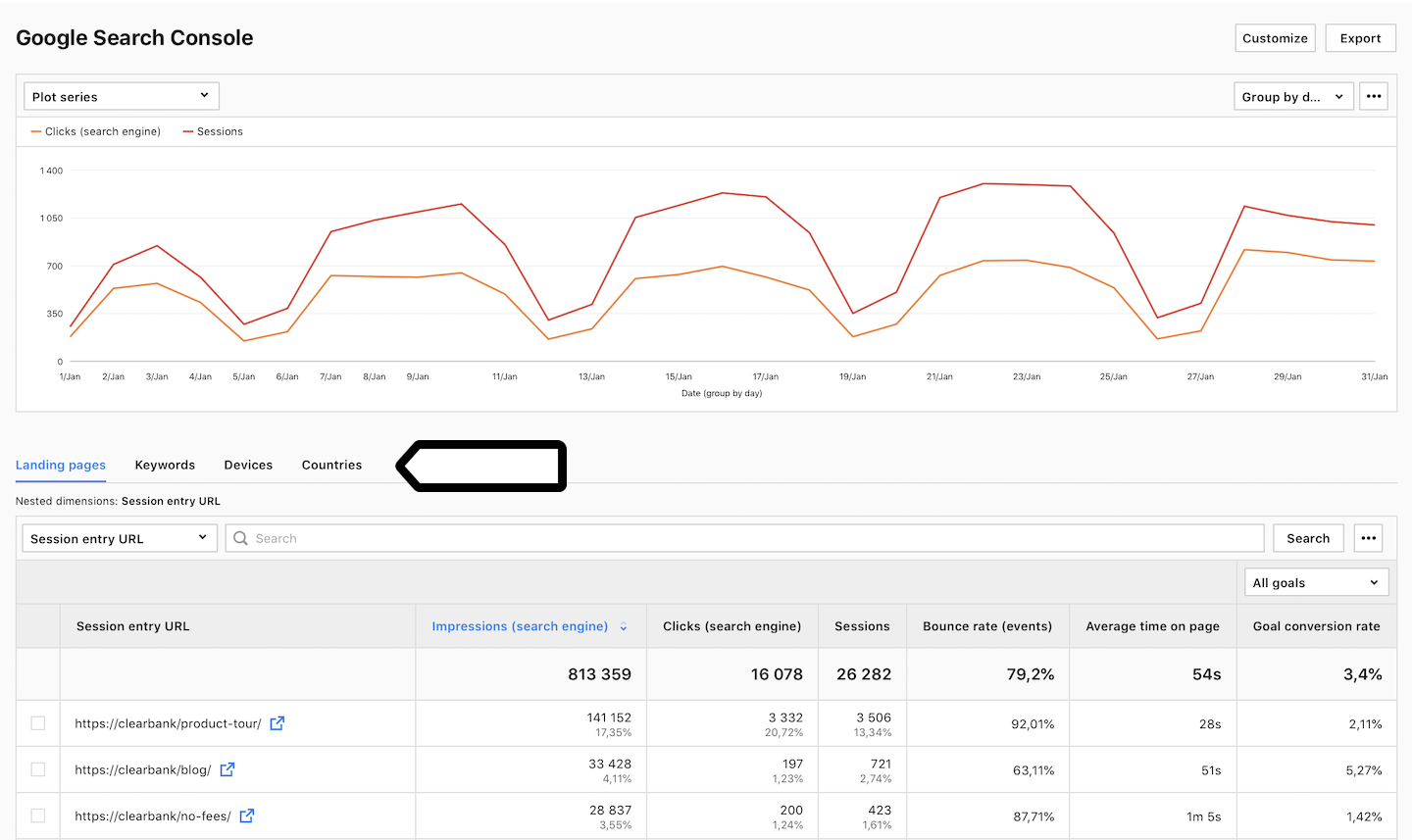
- Performance Reports: Track how your site performs in Google search results, including clicks, impressions, click-through rates, and average position.
- Index Coverage: Monitor the indexing status of your website’s pages and identify any issues that may prevent them from appearing in search results.
- URL Inspection: Debug individual pages to see how Google crawls and indexes them.
- Sitemap Submission: Submit XML sitemaps to help Google discover and index your site’s pages more efficiently.
- Mobile Usability: Check how mobile-friendly your site is and address any issues that may affect user experience on mobile devices.
How to Get Started with Google Search Console
To start using Google Search Console, simply verify ownership of your website by adding a verification code provided by Google to your site’s HTML code or DNS records. Once verified, you can access all the features and reports within the console.
The Benefits of Using Google Search Console
By regularly monitoring and optimizing your website using data from Google Search Console, you can improve your site’s visibility in search results, attract more organic traffic, identify and fix technical issues, enhance user experience, and ultimately boost your online presence.
In Conclusion
Google Search Console is an essential tool for any website owner looking to enhance their online visibility and performance in search results. By leveraging its features effectively, you can gain valuable insights into how users interact with your site on Google and make informed decisions to improve its overall performance. Start using Google Search Console today and take control of your website’s destiny in the digital world!
Top 8 FAQs About Using Google Search Console for SEO
- What is the Google Search Console for SEO?
- How do I access the Google Search Console?
- How do I get Google Search Console without Gmail?
- How do I get to my Google Search Console?
- Is Google Search Console an SEO tool?
- What does Google Search Console do?
- How do I open the Google Search Console?
- How do you use the Google Search Console?
What is the Google Search Console for SEO?
Google Search Console is a vital tool for SEO professionals and website owners looking to optimize their online presence. It provides valuable insights into how Google perceives and ranks your website in search results. By utilizing the data and reports offered by Google Search Console, SEO practitioners can identify opportunities for improvement, monitor website performance, address indexing issues, enhance mobile usability, submit sitemaps for better crawling, and ultimately boost their site’s visibility and organic traffic. In essence, Google Search Console serves as a cornerstone for effective SEO strategies by offering actionable information to help websites rank higher in search engine results pages.
How do I access the Google Search Console?
To access the Google Search Console, you can start by visiting the official Google Search Console website and signing in with your Google account. Once logged in, you will need to verify ownership of your website by adding a verification code provided by Google to your site’s HTML code or DNS records. After successful verification, you will gain access to a wide range of tools and reports that can help you monitor, maintain, and optimize your website’s performance in Google search results. By following these simple steps, you can harness the power of Google Search Console to enhance your online presence and visibility.
How do I get Google Search Console without Gmail?
To access Google Search Console without using a Gmail account, you can create a Google account with a non-Gmail email address. Simply go to the Google account creation page and choose “Use my current email address instead” option to set up your account with an email address from a different provider. Once your Google account is created, you can then verify ownership of your website and gain access to all the features and tools offered by Google Search Console to monitor and optimize your site’s performance in search results.
How do I get to my Google Search Console?
To access your Google Search Console, you can simply go to the official Google Search Console website and sign in with your Google account credentials. Once logged in, you will be able to view and manage all the data and reports related to your website’s performance in Google search results. It’s a straightforward process that allows you to monitor and optimize your site effectively for better visibility and performance online.
Google Search Console is commonly regarded as an essential SEO tool for website owners and digital marketers. While it primarily focuses on providing insights into a site’s performance in Google search results, Google Search Console offers a range of features that are instrumental in optimizing a website for search engines. From monitoring indexing status and identifying technical issues to analyzing search traffic data and improving mobile usability, Google Search Console equips users with valuable information to enhance their site’s SEO performance. By leveraging the tools and reports available within Google Search Console, website owners can make informed decisions to boost their online visibility and attract more organic traffic.
What does Google Search Console do?
Google Search Console is a powerful tool provided by Google that serves as a comprehensive hub for webmasters to monitor, maintain, and optimize their website’s presence in Google search results. It offers a wide range of features and reports that allow users to track their site’s performance, identify indexing issues, submit sitemaps for better crawling, inspect individual URLs for errors, and ensure mobile usability. Essentially, Google Search Console provides valuable insights and data that help website owners enhance their online visibility, attract more organic traffic, address technical issues, improve user experience, and ultimately boost their site’s performance in search engine results.
How do I open the Google Search Console?
To open Google Search Console, start by visiting the official website at https://search.google.com/search-console/. If you already have a Google account, simply sign in using your credentials. If not, you can create a new account for free. Once logged in, follow the prompts to add and verify your website by either uploading an HTML file to your site’s root directory or adding a meta tag to your site’s HTML code. After successful verification, you will gain access to valuable insights and tools to monitor and optimize your website’s performance in Google search results.
How do you use the Google Search Console?
To use the Google Search Console effectively, start by verifying ownership of your website through adding a verification code provided by Google to your site’s HTML code or DNS records. Once verified, you can access a range of powerful tools and reports within the console. Utilize features such as performance reports to track clicks, impressions, and average position in search results, index coverage to monitor indexing status, URL inspection to debug individual pages, sitemap submission for efficient page discovery, and mobile usability to enhance user experience on mobile devices. Regularly monitoring and optimizing your website using data from Google Search Console can lead to improved visibility in search results and a stronger online presence overall.
Tags :
google search console,
google search results,
indexing status,
insights,
mobile usability,
monitoring,
online visibility,
ownership verification,
reports,
seo,
sitemap submission,
tool,
troubleshooting,
verification code,
webmaster,
website performance