
Website On-Page SEO: A Practical Guide to Improving Your Pages
On-page SEO is the practice of improving individual website pages so search engines can understand their content and visitors can find the information they need. It includes the words on a page, the way that information is organized, and elements such as title tags, internal links, and images.
Strong on-page SEO does not mean repeating keywords as often as possible. It means creating useful, clear pages that match what people are looking for and making those pages easy to navigate.
What Is On-Page SEO?
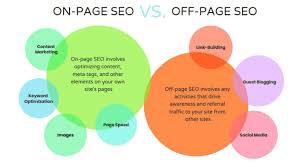
On-page SEO includes content and HTML elements that website owners can manage directly. It differs from off-page SEO, which focuses on signals from outside a website, such as links from other sites. It is also distinct from technical SEO, which addresses issues such as site speed, crawling, and indexing, although the areas can overlap.
Common on-page SEO elements include:
- Page titles and meta descriptions
- Headings and page structure
- Written content and keyword use
- URLs and internal links
- Image file names and alternative text
- Mobile-friendly, readable page layouts
Understand What the Searcher Needs
Before writing or updating a page, consider the reason someone would search for the topic. They may want to learn how something works, compare options, find a local service, or make a purchase. A page is more useful when it addresses that need directly.
Review the questions your audience asks, the language they use, and the type of information that would help them take the next step. Search results can offer clues about the expected format, but the goal should be to create a page that is genuinely helpful—not simply imitate other results.
Choose a Clear Primary Topic
Each page should have a clear focus. Choose a primary topic or search phrase that reflects the page’s purpose, then use related terms naturally where they make sense. These may include synonyms, subtopics, and common questions.
Avoid forcing the same phrase into every paragraph. Repetitive keyword use can make content awkward and less useful. Write for people first, and use terminology that accurately describes the page.
Write a Descriptive Title Tag
The title tag is an HTML element that can appear as the clickable title in search results and in a browser tab. Write a distinct title for each important page. It should accurately describe the content and give readers a clear reason to visit.
For example, a page about improving a small business website might use a title such as Small Business Website SEO: A Practical Checklist. Keep titles concise enough to communicate the main idea, and avoid stuffing them with keywords.
Create a Useful Meta Description
A meta description summarizes a page and may appear beneath its title in search results. Search engines do not always display the description provided, but a clear, specific summary can help people decide whether the page is relevant to them.
Describe what the visitor will learn or be able to do. Avoid vague claims and make sure the description matches the actual page content.
Organize Content with Headings
Headings help readers scan a page and understand how its ideas fit together. Use one clear main heading, usually an <h1>, followed by descriptive section headings such as <h2> and, when needed, <h3>.
Headings should describe the section that follows. They are not just a place to add keywords, and they should follow a logical hierarchy rather than being selected solely for their visual size.
Make the Content Clear and Complete
Put the most important information where readers can find it easily. Explain unfamiliar terms, use short paragraphs, and include examples or steps when they improve understanding. Cover the topic thoroughly enough to answer the visitor’s likely questions, but do not add filler just to make a page longer.
Accurate information matters. Review pages periodically, especially when they discuss changing products, policies, prices, or industry guidance. If a page makes a claim that needs support, cite reliable sources where appropriate.
Use Internal Links Thoughtfully
Internal links connect one page on your website to another. They help visitors discover related information and help search engines understand how pages relate to one another.
Link when the destination provides useful context or a natural next step. Use descriptive link text, such as learn how to write a meta description, rather than vague text like “click here.” Check links periodically to make sure they still work.
Write Descriptive URLs
A short, readable URL can give people a useful idea of what a page is about. Use clear words, separate words with hyphens, and avoid unnecessary numbers or long strings of parameters when possible.
For example, example.com/website-on-page-seo is easier to interpret than a URL made up of unrelated characters. If you change an existing URL, plan the change carefully and redirect the old address so visitors and search engines can reach the new page.
Optimize Images Accessibly
Images can make a page more informative, but they should not get in the way of loading or accessibility. Use suitable image sizes and formats, and give files descriptive names when practical.
Write alternative text that explains the purpose or meaningful content of an image for people using screen readers. Decorative images can generally use empty alternative text. Avoid adding keywords to alternative text when they do not describe the image.
Make Pages Easy to Use on Mobile
Visitors should be able to read and interact with a page on a range of screen sizes. Use a responsive layout, readable text, clear navigation, and buttons or links that are easy to tap. Test important pages on both desktop and mobile devices.
Good usability supports the overall experience, but it is not a substitute for relevant, accurate content. Review pages from the visitor’s perspective: Is the answer easy to find? Are the next steps clear? Does anything make the page frustrating to use?
Add Structured Data When It Fits
Structured data is a standardized way to describe certain information on a page, such as a product, organization, or event. Search engines may use eligible structured data to better understand content and, in some cases, display enhanced search results.
Use structured data only when it accurately describes visible page content and follows current search engine guidelines. It does not guarantee a special search result or higher rankings.
A Simple On-Page SEO Checklist
- Does the page clearly address a specific audience need?
- Is the main topic apparent from the title and main heading?
- Is the title tag unique and descriptive?
- Does the meta description accurately summarize the page?
- Are headings organized in a logical order?
- Is the content useful, accurate, and easy to read?
- Do internal links point to relevant pages with descriptive link text?
- Are the URL and image descriptions clear?
- Does the page work well on mobile devices?
- Are there broken links, outdated details, or unnecessary distractions?
How to Measure and Improve On-Page SEO
Use analytics and search performance tools to see how pages are performing over time. Look at relevant measures such as impressions, clicks, search queries, engagement, and conversions. These metrics can help identify pages that may need clearer titles, more complete information, stronger internal links, or an improved visitor experience.
Make changes based on evidence and review results after enough time has passed to assess their impact. Search performance can be affected by many factors, so a change to one page does not guarantee a particular ranking or increase in traffic.
Build Pages for People First
Effective website on-page SEO brings together useful content, clear organization, and thoughtful page details. Start with the visitor’s needs, make the information easy to understand, and review each page regularly. Over time, these practices can make a website more helpful to its audience and easier for search engines to interpret.