
On-Page SEO Optimization: A Practical Guide
On-page SEO optimization is the process of improving individual web pages so search engines can understand their content and visitors can find the information they need. It includes both the words on a page and elements in its HTML, such as title tags, headings, image descriptions, and links.
Strong on-page SEO can make a page more relevant to search queries and easier to use. It does not guarantee a particular ranking, but it helps create a clear, useful experience for both people and search engines.
Match the Page to Search Intent
Before writing or updating a page, consider what someone is hoping to accomplish when they search for your topic. They may want an explanation, a comparison, a product, or a specific service. The page should meet that need directly.
For example, someone searching for “how to clean a coffee maker” likely wants step-by-step instructions, while someone searching for “coffee maker repair near me” is probably looking for a local service. A page that matches the searcher’s goal is more useful than one that simply repeats the same keyword.
Choose a Clear Primary Topic
Identify the main topic of the page and use related terms naturally. Keyword research can help reveal how people describe a subject, but keywords should guide the content—not dictate awkward wording.
Avoid keyword stuffing, or unnaturally repeating a phrase in an attempt to influence rankings. Instead, use clear language, answer related questions, and include relevant details that help readers understand the topic.
Write a Descriptive Title Tag
The title tag is an HTML element that can appear as the clickable headline in search results and in a browser tab. Write a distinct, concise title that accurately describes the page. Include the main topic when it fits naturally, and avoid vague or repetitive titles.
For example, “On-Page SEO: A Practical Optimization Guide” is more informative than “SEO Tips.” Search engines may display a different title in results, so write for clarity rather than relying on a fixed character limit.
Create a Useful Meta Description
A meta description summarizes a page and may appear beneath its title in search results. It is not a direct ranking factor, but a clear summary can help people decide whether the page is relevant to them.
Describe what readers will learn or be able to do. Keep the description specific to the page, avoid exaggerated promises, and do not use the same description across an entire website.
Organize Content with Headings
Headings make a page easier to scan and help organize its ideas. Use one clear main heading, typically an h1, followed by descriptive subheadings such as h2 and h3 where appropriate.
Headings should reflect the content that follows. They are not just a place to insert keywords, and they should follow a logical structure rather than being chosen for their visual size.
Make the Content Helpful and Easy to Read
Good on-page SEO starts with content that serves the reader. Explain the topic accurately, provide enough detail to answer the likely questions, and make important information easy to find. Use short paragraphs, descriptive lists, examples, and plain language when they improve readability.
Review content for accuracy, outdated information, and unnecessary repetition. Add original insight where possible, and make sure the page offers value beyond what a visitor could get from a generic summary.
Use Clean, Descriptive URLs
A readable URL gives visitors and search engines a clue about a page’s subject. Keep it concise, use words that describe the content, and separate words with hyphens. Avoid long strings of numbers or unnecessary parameters when a simpler URL will work.
Changing an established URL can affect visitors and search visibility. If a URL must change, set up an appropriate redirect and update internal links that point to the old address.
Optimize Images
Images can make a page clearer and more engaging, but large files may slow it down. Use appropriately sized images and modern file formats when supported. Give image files descriptive names when practical.
Write alternative text, or alt text, to describe an image when that description helps people using screen readers understand its purpose. If an image is purely decorative, it may need empty alt text. Alt text should describe the image, not serve as a place to insert extra keywords.
Add Relevant Internal Links
Internal links connect one page on your website to another. They help visitors discover related information and can help search engines find and understand pages across your site.
Link to pages that are genuinely useful in context. Use descriptive anchor text—such as “read our guide to local SEO”—instead of vague text like “click here” whenever possible. Check links periodically to find broken or outdated destinations.
Consider Structured Data
Structured data is code that describes information on a page in a format search engines can interpret. Depending on the page and the type of structured data used, it may help search engines understand details such as a product, organization, or event.
Structured data does not guarantee enhanced search results. It should accurately reflect visible page content and follow the relevant search engine guidelines. Test the markup with available validation tools before publishing.
Support a Good Page Experience
Visitors should be able to use a page comfortably on phones, tablets, and computers. Make text readable, keep navigation clear, and avoid intrusive elements that block the main content. Pay attention to loading speed and layout stability as part of the broader experience.
Page experience involves more than on-page SEO, but it matters because a page that is difficult to use can frustrate visitors. Review important pages on multiple devices and fix issues that interfere with reading or completing a task.
Measure and Improve
On-page optimization is an ongoing process. Review performance using tools such as Google Search Console and website analytics. Look at which queries bring visitors to a page, whether the page is earning impressions, and whether visitors are taking the actions that matter to your organization.
Use the data to identify opportunities, but avoid making changes based on a single short-term fluctuation. Update pages when information changes, when readers need clearer answers, or when performance data points to a meaningful improvement.
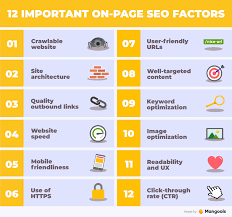
On-Page SEO Checklist
- The page serves a clear audience and matches the likely search intent.
- The title tag and main heading accurately describe the page.
- The content is useful, well organized, and easy to read.
- Keywords and related terms appear naturally.
- The URL is clear and descriptive.
- Images are appropriately sized and have suitable alt text.
- Relevant internal links help visitors explore related content.
- The page works well on mobile devices and is easy to navigate.
- Any structured data is accurate and supported by visible content.
- The page is reviewed and updated as needed.
Conclusion
Effective on-page SEO is not about checking off isolated technical tasks or repeating a keyword as often as possible. It is about making each page clear, relevant, accessible, and genuinely useful. Start with the reader’s needs, organize the information carefully, and use page elements—such as titles, headings, images, and links—to support that experience.