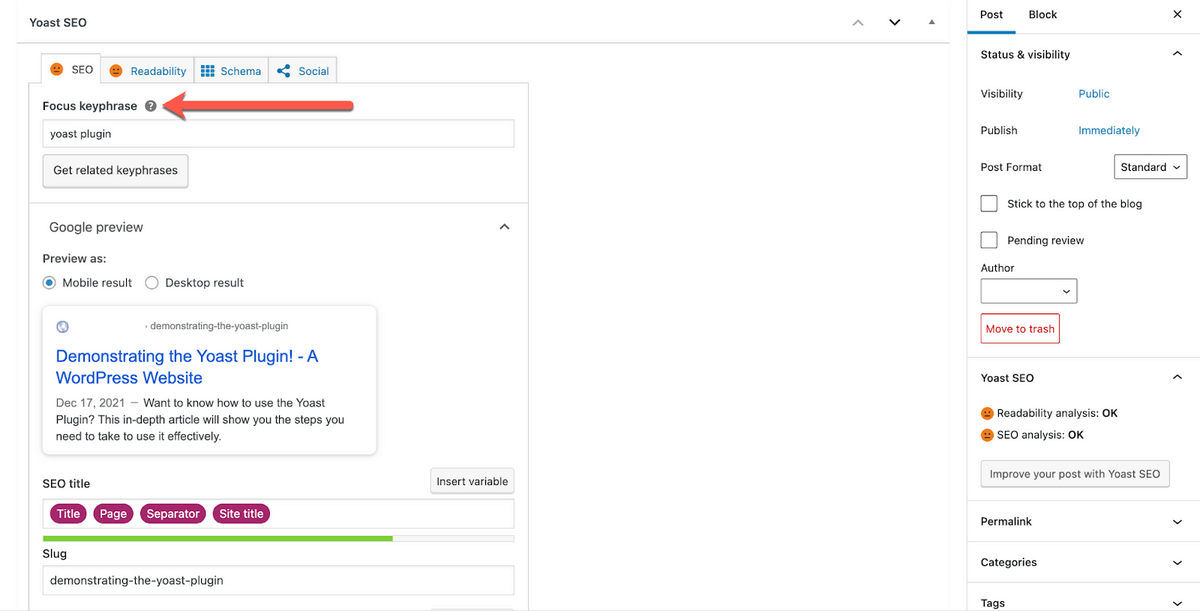
When it comes to optimizing your website for search engines, Yoast WordPress Plugin stands out as a powerful tool that can significantly boost your SEO efforts. With over 5 million active installations, Yoast has become a go-to plugin for website owners looking to improve their search engine rankings and increase organic traffic.
One of the key features of Yoast is its user-friendly interface that guides you through the process of optimizing your content for specific keywords. The plugin provides real-time feedback on the readability and SEO-friendliness of your content, giving you valuable insights on how to improve your on-page SEO.
Another standout feature of Yoast is its ability to generate XML sitemaps automatically, making it easier for search engines to crawl and index your website. This helps ensure that your content is discovered and ranked more efficiently in search engine results pages.
Yoast also offers advanced features such as the ability to set canonical URLs, manage meta tags, and optimize social media previews. These tools give you greater control over how your content appears in search results and social media platforms, ultimately increasing click-through rates and engagement.
Furthermore, Yoast provides comprehensive analysis of your website’s overall SEO performance through its built-in tools. From monitoring keyword density to checking for broken links, Yoast equips you with the necessary data to make informed decisions about improving your website’s SEO.
In conclusion, Yoast WordPress Plugin is a must-have tool for anyone serious about optimizing their website for search engines. With its intuitive interface, powerful features, and actionable insights, Yoast empowers website owners to take their SEO efforts to the next level and achieve better visibility online.
One of the standout pros of Yoast WordPress Plugin is its user-friendly interface, designed to streamline the process of optimizing content for search engines. With intuitive features and clear guidance, Yoast makes it easy for website owners to improve their on-page SEO without needing a deep understanding of technical SEO concepts. This accessibility allows users to quickly and efficiently enhance their content for specific keywords, readability, and overall SEO-friendliness, ultimately boosting their website’s visibility and search engine rankings.
One of the standout pros of Yoast WordPress Plugin is its provision of real-time feedback on content readability and SEO-friendliness. This feature is invaluable for website owners and content creators as it offers instant insights on how to enhance the quality and visibility of their content. By analyzing factors such as sentence structure, paragraph length, subheadings, and keyword optimization, Yoast helps users craft more engaging and search engine-friendly content that resonates with both readers and search engines alike. This real-time feedback ensures that content is not only well-written but also optimized for maximum impact in terms of SEO performance.
One of the standout benefits of Yoast WordPress Plugin is its ability to automatically generate XML sitemaps, which plays a crucial role in improving the indexing of your website by search engines. By creating XML sitemaps, Yoast ensures that search engine crawlers can easily navigate and understand the structure of your site, leading to more efficient indexing of your content. This feature not only helps boost your website’s visibility in search results but also enhances overall SEO performance by ensuring that all your valuable content is properly recognized and ranked by search engines.
One of the key advantages of Yoast WordPress Plugin is its ability to set canonical URLs and manage meta tags effectively. By setting canonical URLs, website owners can avoid duplicate content issues and ensure that search engines prioritize the correct version of a webpage for indexing. Additionally, the ability to manage meta tags allows users to optimize how their content appears in search engine results, increasing visibility and click-through rates. These features not only enhance the overall SEO performance of a website but also provide greater control over how content is presented to users, ultimately contributing to a more effective online presence.
One of the key advantages of using Yoast WordPress Plugin is its ability to optimize social media previews, leading to increased engagement with your content. By allowing you to customize how your content appears on social media platforms like Facebook and Twitter, Yoast ensures that your posts are visually appealing and compelling to users scrolling through their feeds. This feature not only helps drive more traffic to your website but also encourages users to click through and engage with your content, ultimately boosting your overall social media presence and brand visibility.
One of the standout pros of Yoast WordPress Plugin is its comprehensive analysis tools that provide invaluable insights for monitoring SEO performance. From tracking keyword density to identifying broken links, Yoast equips website owners with the data needed to make informed decisions about optimizing their content for search engines. By offering detailed reports and actionable recommendations, Yoast’s analysis tools empower users to continually improve their website’s SEO strategy and enhance their online visibility.
One significant advantage of using Yoast WordPress Plugin is its ability to enhance click-through rates in search engine results pages. By optimizing meta titles, meta descriptions, and social media previews, Yoast helps ensure that your content appears more compelling and relevant to users searching for specific keywords. This increased visibility and attractiveness in search results can lead to higher click-through rates, ultimately driving more organic traffic to your website.
One of the key advantages of Yoast WordPress Plugin is that it empowers website owners to make informed decisions about their SEO strategies. By providing real-time feedback on content optimization, keyword usage, and overall SEO performance, Yoast enables users to understand what aspects of their website need improvement and how to implement effective changes. This valuable insight allows website owners to take control of their SEO efforts, make data-driven decisions, and ultimately enhance their online visibility and search engine rankings.
One notable drawback of Yoast WordPress Plugin is the limited functionality offered in the free version when compared to the premium version. While the free version provides basic SEO features such as content analysis and XML sitemap generation, users may find themselves wanting more advanced tools and capabilities that are only available in the premium version. Features like internal linking suggestions, multiple keyword optimization, and advanced social media previews are reserved for premium users, which can be a disadvantage for those looking to fully optimize their website without investing in the premium upgrade.
One notable downside of Yoast WordPress Plugin is that it can be overwhelming for beginners due to the abundance of features and settings it offers. For users who are new to SEO optimization, navigating through the various options and configurations in Yoast can be daunting and confusing. The sheer number of features available may lead to decision paralysis and make it challenging for beginners to understand which settings are essential for their specific needs. This complexity can potentially hinder the initial learning curve and usability of the plugin for users who are not familiar with SEO best practices.
Some users have reported experiencing occasional compatibility issues with other plugins or themes when using Yoast WordPress Plugin. These issues may arise due to conflicts in coding or functionalities between Yoast and certain third-party plugins or themes. While the vast majority of users do not encounter such problems, it is important to be aware that there is a possibility of compatibility issues when integrating Yoast with other elements of your website. It is recommended to thoroughly test Yoast with your existing plugins and themes to ensure smooth operation and functionality across all aspects of your website.
One drawback of using Yoast WordPress Plugin is that the heavy focus on keyword optimization may sometimes result in content that feels forced, unnatural, or overly optimized. In an effort to meet the plugin’s recommendations for keyword density and placement, there is a risk of sacrificing the natural flow and readability of the content. This can lead to a negative user experience and potentially harm the overall quality of the content, as the primary focus shifts towards meeting SEO requirements rather than providing valuable and engaging information to the audience. It is important for users to strike a balance between SEO optimization and maintaining authentic, user-friendly content when utilizing Yoast or any other SEO tool.
Regular updates and changes in algorithm requirements with Yoast WordPress Plugin can pose a significant challenge for users, leading to potential confusion or disruptions in their SEO strategies. As search engine algorithms evolve, the need to adapt and stay up-to-date with the latest SEO best practices becomes crucial. However, frequent updates from Yoast to align with these changes may require users to constantly reevaluate and adjust their optimization strategies, which can be time-consuming and potentially impact the effectiveness of their SEO efforts.
One notable drawback of Yoast WordPress Plugin is that it may not cover all aspects of technical SEO, necessitating the use of additional tools or expertise for a more comprehensive approach. While Yoast excels in providing guidance for on-page optimization and content analysis, it may lack certain advanced features required for in-depth technical SEO tasks such as website performance optimization, structured data implementation, or server configurations. Users seeking a more holistic SEO strategy may find themselves needing to supplement Yoast with other tools or consulting services to address these technical aspects effectively.
