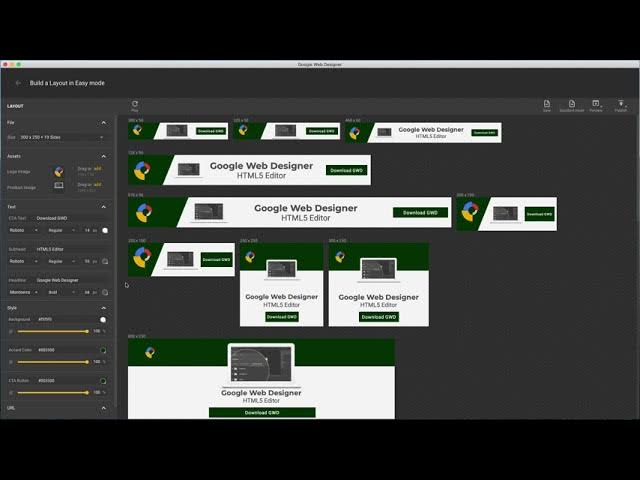
Google Web Designer: A Powerful Tool for Creating Stunning Web Content
Google Web Designer is a versatile and user-friendly tool that allows designers and developers to create engaging and interactive web content. Whether you are a seasoned professional or just starting out, Google Web Designer provides a range of features and capabilities to bring your creative vision to life.
One of the key advantages of Google Web Designer is its intuitive interface, which makes it easy to design visually appealing content without the need for extensive coding knowledge. The tool offers a range of pre-built templates and components that can be customized to suit your specific needs. From animated banners to interactive ad units, Google Web Designer provides the flexibility to create dynamic content that captures the attention of your audience.
In addition to its design capabilities, Google Web Designer also supports HTML5, CSS3, and JavaScript, allowing for seamless integration with other web technologies. This means that you can create responsive and interactive content that looks great on any device, from desktops to smartphones.
Another standout feature of Google Web Designer is its built-in animation tools. With support for keyframe animations and 3D transformations, you can bring your designs to life with smooth transitions and eye-catching effects. Whether you are creating a simple banner ad or a complex interactive website, Google Web Designer offers the tools you need to make your content stand out.
Furthermore, Google Web Designer provides robust testing and debugging tools that help ensure your content works flawlessly across different browsers and devices. With real-time previews and debugging capabilities, you can quickly identify and fix any issues before publishing your content online.
Overall, Google Web Designer is a powerful tool that empowers designers and developers to create stunning web content with ease. Whether you are looking to create engaging ads, interactive websites, or rich media experiences, Google Web Designer has the features and flexibility to bring your ideas to life. Explore the possibilities with Google Web Designer and take your web design projects to the next level.
Utilize the timeline feature in Google Web Designer to effortlessly craft captivating animations and seamless transitions for your web content. By leveraging this powerful tool, you can precisely control the timing and sequencing of your elements, bringing movement and interactivity to your designs. Whether you are looking to add subtle fades or dynamic motion effects, the timeline feature empowers you to create engaging visual experiences that captivate your audience and elevate the overall user experience of your website or ad campaign.
To enhance your design capabilities in Google Web Designer, consider utilizing the code view feature for more advanced customization and control. By delving into the code view, you can fine-tune your designs with precision, implement complex functionalities, and tailor your web content to meet specific requirements. This feature allows experienced developers to leverage their coding skills and create highly customized and interactive elements within their projects. Embracing the code view in Google Web Designer opens up a world of possibilities for those seeking to push the boundaries of creativity and innovation in web design.
When using Google Web Designer, it is highly beneficial to take advantage of the built-in components and templates to expedite the design process. These pre-built resources not only save time but also offer a great starting point for creating visually appealing and interactive web content. By leveraging the built-in components and templates, designers can quickly customize and adapt them to suit their specific needs, leading to faster development and more efficient workflow. Whether you are creating banners, ads, or interactive elements, utilizing these ready-made resources in Google Web Designer can help streamline your design process and bring your creative vision to life in a timely manner.
When using Google Web Designer, it is essential to preview your designs in different screen sizes to ensure responsiveness. By testing your designs across various devices and screen resolutions, you can identify any layout or formatting issues that may arise. Previewing your designs in different screen sizes allows you to optimize the user experience and ensure that your content looks great on desktops, laptops, tablets, and smartphones. This proactive approach helps you create web content that adapts seamlessly to different devices, enhancing accessibility and engagement for your audience.
Optimizing images and assets is a crucial tip in Google Web Designer to enhance loading times and improve overall website performance. By reducing the file size of images and other media assets without compromising quality, you can significantly speed up the loading time of your web content. This optimization not only creates a better user experience by ensuring faster page load times but also helps with SEO rankings as search engines favor websites that load quickly. Incorporating this best practice in Google Web Designer allows you to create visually appealing and high-performing web content that engages users effectively.
