On-site optimization is the process of improving a website’s content, structure, and technical setup so visitors and search engines can understand it more easily. Also called on-page optimization, it helps align each page with the needs of its audience and the topics it aims to cover.
Good optimization is about more than adding keywords. It combines helpful content, clear navigation, fast performance, mobile usability, and descriptive page elements. Together, these improvements can make a site easier to use and easier for search engines to interpret.
Before changing a page, consider what someone is looking for when they search for its topic. They may want a quick answer, a detailed guide, a product comparison, or a service provider. The page should meet that need directly.
Review the questions and concerns your intended visitors are likely to have. Then make sure the page answers them clearly, with enough detail to be useful. Avoid adding information simply to make a page longer.
Strong page content is accurate, easy to read, and focused on a clear subject. Use headings to organize the information into logical sections, and keep paragraphs manageable. Explain specialized terms when they may be unfamiliar to readers.
Each page should have a distinct purpose. If several pages cover nearly identical topics, consider whether they should be combined or clarified so that visitors and search engines can tell them apart.
The page title, often shown as the clickable headline in search results, should describe the page accurately and make its purpose clear. Keep it concise and specific. Avoid repeating the same phrase unnaturally or promising something the page does not deliver.
Use one clear main heading for the page, followed by descriptive subheadings. A logical heading structure helps readers scan the content and understand how the sections relate to one another.
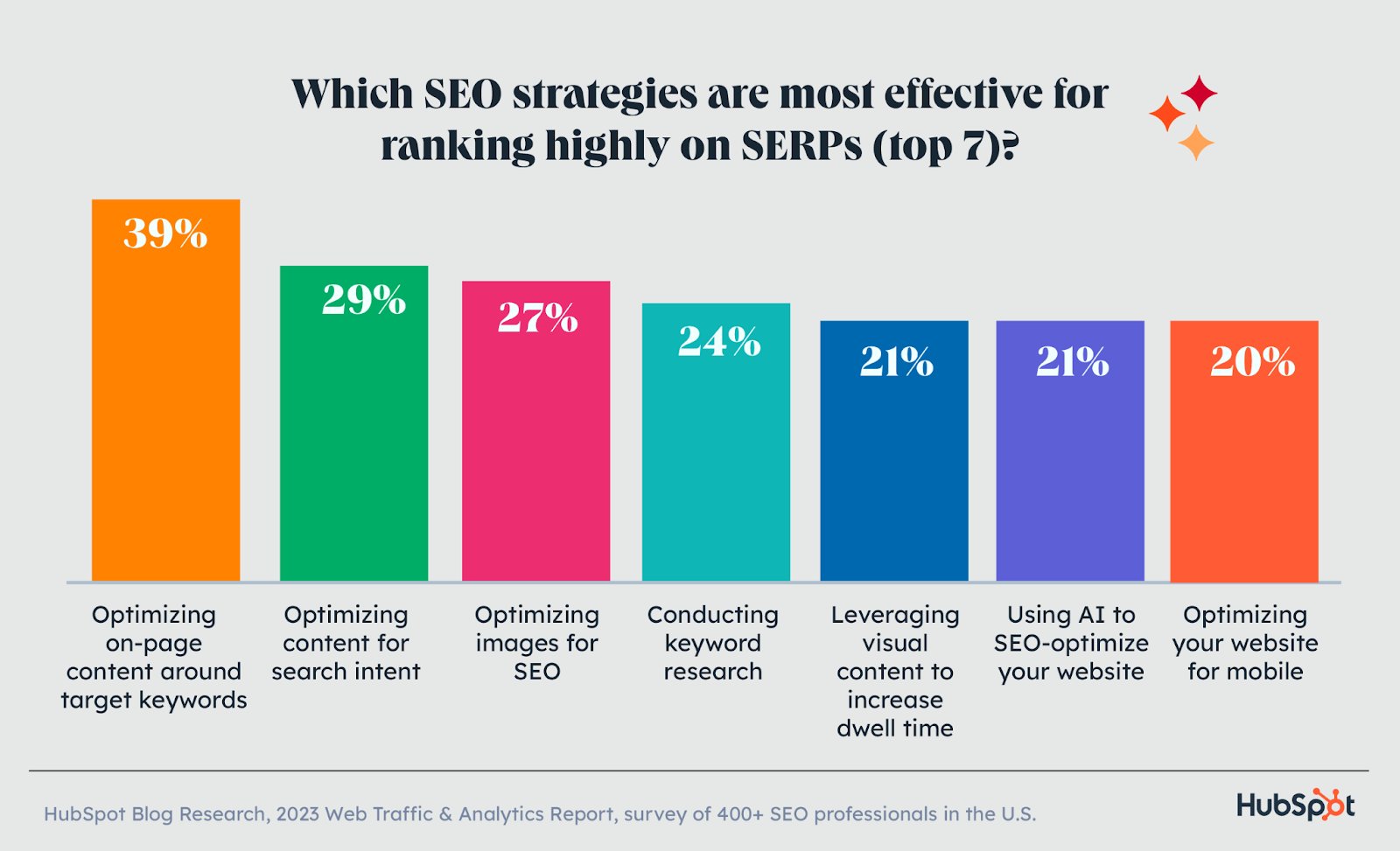
Keywords can help indicate what a page is about, but they should fit naturally into the writing. Include the main topic where it makes sense, such as in the title, main heading, introduction, and relevant sections. Related terms and common questions can add context.
There is no benefit to forcing a keyword into every paragraph. Repetitive wording can make content harder to read. Write for people first, then check that the page clearly reflects its subject.
A meta description is a short summary that may appear beneath a page title in search results. It does not need to be a list of keywords. Instead, describe what the page offers and give searchers a clear reason to visit.
Write a unique description for important pages, and make sure it accurately reflects the content. Search engines may choose to display a different excerpt, but a well-written description can still help set expectations.
Use short, readable URLs that give visitors an idea of what a page contains. Separate words with hyphens, avoid unnecessary numbers or parameters when possible, and keep the address consistent over time. If a URL must change, use an appropriate redirect so visitors and search engines can find the new page.
Internal links connect pages on your website. Add them where they help visitors discover related information, services, or resources. Use descriptive link text so readers know what to expect when they click.
Images can make a page more engaging, but large files may slow it down. Resize images to the dimensions needed on the page and use an appropriate file format. Descriptive file names can also help with organization.
Add alternative text to images when they communicate useful information. The alt text should describe the image’s purpose or content in context. For purely decorative images, use an empty alt attribute so assistive technologies can skip them.
Technical issues can make a site frustrating to use or difficult for search engines to access. Check that important pages load correctly, can be crawled, and do not contain broken links. Use a secure HTTPS connection and ensure that the site works well on mobile devices.
Page speed matters to visitors, especially on mobile connections. Compress images, reduce unnecessary scripts, and review third-party tools that may slow down the page. Test performance regularly, since new features and content can affect load times.
Visitors should be able to find key information without guesswork. Use clear menus, meaningful category names, and a consistent layout. Important pages—such as contact, service, product, or support pages—should be easy to reach.
Good navigation also supports search engines by helping them discover how pages connect. A clear site structure can make a large website easier to manage and understand.
On-site optimization is an ongoing process. Review performance using analytics and search tools, and look for patterns such as pages with declining traffic, low engagement, or technical errors. Use those findings to prioritize improvements.
When updating a page, make changes that genuinely improve its usefulness or usability. Keep track of significant edits and monitor results over time. Search performance can fluctuate, so avoid drawing conclusions from a short-term change alone.
Effective on-site optimization brings together useful content, clear organization, accessible design, and reliable technical performance. By improving these elements with visitors in mind, you can create pages that are easier to use and easier to understand. Review your site regularly, address the most important issues first, and make each update serve a clear purpose.
On-site optimization is the process of improving elements on your website to make pages easier for visitors to use and for search engines to understand. It includes creating helpful, well-organized content, using clear page titles and headings, improving internal links and navigation, optimizing images and page speed, and ensuring the site works well on mobile devices. The goal is to make each page relevant, accessible, and useful to its intended audience.
On-site optimization is important for SEO because it helps search engines understand what each page is about and how it can serve searchers’ needs. Clear, useful content, descriptive titles and headings, well-organized links, and strong technical performance can also make your site easier for visitors to navigate. Together, these improvements can help search engines assess your pages and give people a better experience once they arrive.
The most important on-site optimization factors are helpful, relevant content that matches what visitors are looking for; clear page titles and headings; natural use of relevant keywords; descriptive URLs and internal links; and a fast, mobile-friendly, accessible website. It’s also important to use images efficiently, provide useful alt text, and make navigation easy to follow. Focus on creating a good experience for visitors rather than trying to overuse keywords or optimize for search engines alone.
To optimize a page for a target keyword, first understand what people searching that term want to find, then create useful content that meets that need. Include the keyword naturally in the page title, main heading, URL, introduction, and relevant subheadings where appropriate, along with related terms that add context. Keep the writing clear and avoid keyword stuffing. Also add relevant internal links, descriptive image alt text, and a concise meta description, and make sure the page loads quickly and works well on mobile devices.
There’s no single schedule for updating website content, but it’s a good idea to review key pages every few months and whenever information, services, or search intent changes. Update content when facts become outdated, visitors’ needs shift, or performance data shows a page could be more useful. Some pages, such as pricing, policies, and time-sensitive articles, may need more frequent attention, while evergreen content may only need occasional adjustments. Focus on making meaningful improvements rather than changing pages just to meet a schedule.
Measure on-site optimization by tracking a mix of search, engagement, and conversion metrics over time. Use tools such as Google Search Console to monitor impressions, clicks, rankings, and indexing issues, and analytics tools to review organic traffic, engagement, and conversions like purchases, form submissions, or calls. Compare performance with a baseline from before the changes, and account for seasonality or other marketing activity. Since results can take time, review trends over several weeks or months and connect each improvement to the changes made.
